Download PTS Booster
Windows 10/11 · 64-bit
The app and its voice tips are in Russian for now.
Every feature for free
PTS Booster is in open beta. While the beta lasts, every feature is available without a subscription or payment. Download the app and sign in.
Found a bug or have an idea? Write to support.
Download for Windows
Check the file on VirusTotalLinux version (beta)
Linux (beta)
One AppImage file for x86_64: Ubuntu 22.04 or newer, Fedora, Arch and their derivatives. It updates itself together with the Windows version.
- Allow the file to run and open it:
chmod +x ptsbooster-linux-x86_64.AppImage
./ptsbooster-linux-x86_64.AppImage - After the first start PTS Booster appears in the application menu.
Verify the files: SHA256SUMS
Microsoft's warning
Microsoft Defender SmartScreen shows a blue window when new programs start that have few downloads and no reputation with Microsoft yet, so the publisher is shown as unknown. The window itself does not mean a virus was found in the file. If in doubt, check the file on VirusTotal.
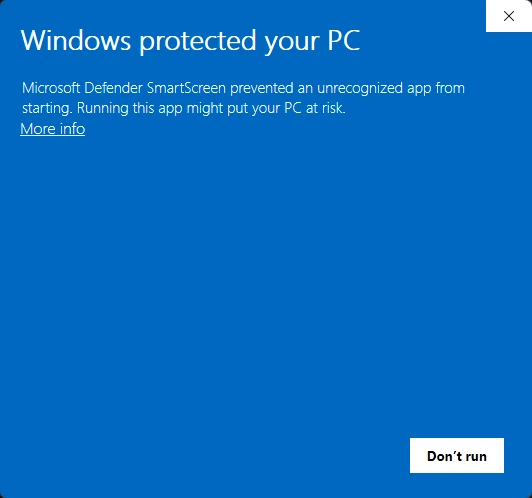
Step 1Click «More info» under the warning. 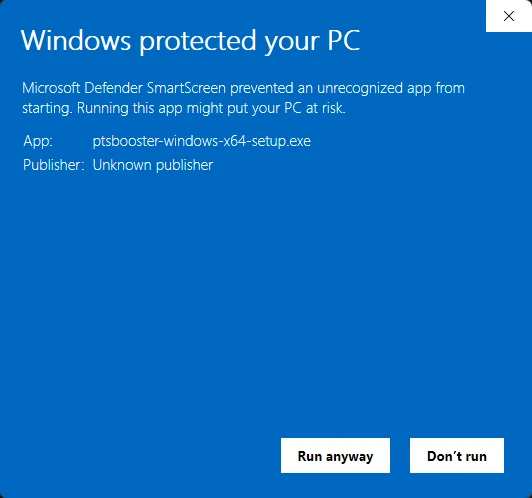
Step 2Check that the App line shows ptsbooster-windows-x64-setup.exe and click «Run anyway».